20KB vs. 50KB vs. 100KB: How Much Quality Do You Actually Lose at Each Size?
Visual comparison of image compression trade-offs at 20KB, 50KB, and 100KB file size targets for various photograph types.
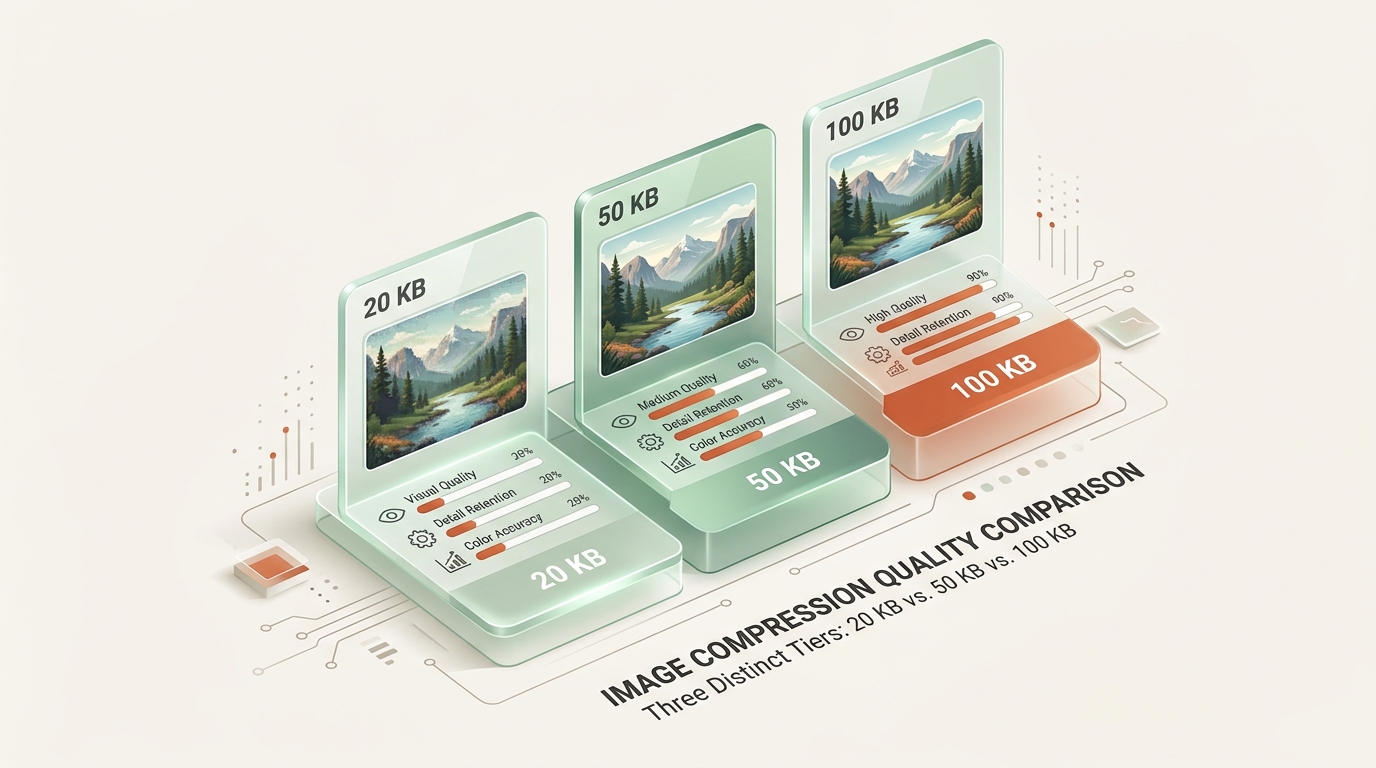
Not every upload form demands the same file size limit, and the difference between 20KB, 50KB, and 100KB matters more than most people assume. Each step up the scale buys real, visible improvement, but exactly how much depends on your image content. This comparison lays out what you actually gain, and lose, at each of these three common compression targets.
Image Compression Fundamentals: What Happens as File Size Increases?
How File Size Budgets Dictate Compression Algorithm Behavior
More available file size simply means the compression algorithm has more room to preserve detail before it needs to start cutting corners. Think of it as a budget: 20KB forces aggressive trade-offs immediately, while 100KB allows the algorithm to keep far more of the original image quality intact.
The Law of Diminishing Visual Returns Across Compression Tiers
The relationship isn’t perfectly linear. Doubling file size doesn’t automatically double perceived quality, since early kilobytes buy more visible improvement than later ones—a pattern known as diminishing returns that shows up clearly once you compare all three sizes side by side.
Side-by-Side Quality Comparison: 20KB vs. 50KB vs. 100KB
1. The 20KB Tier: Maximum Compression for Strict Portal Limits
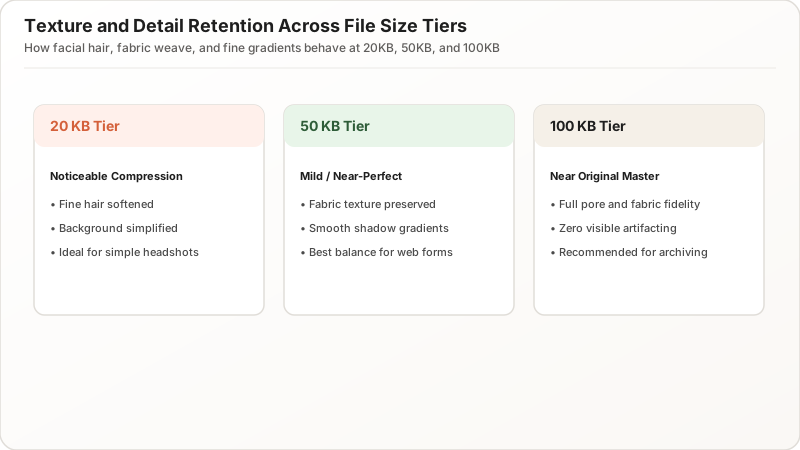
At 20KB, simple images like plain headshots or flat-background graphics hold up reasonably well, since there’s less complex detail competing for limited space. Busy, detailed photographs fare worse, often showing visible compression artifacts, softened texture, and occasional color banding in gradient areas.
This is the tightest of the three common targets, and it genuinely requires the most compromise. Expect visible, if usually acceptable, quality loss at this level for anything beyond simple portrait photography.
2. The 50KB Tier: The Optimal Balance for Web Performance and Clarity
Jump to 50KB, and the improvement is noticeable immediately. Fine textures like hair and fabric weave start holding together better, gradient banding largely disappears, and overall sharpness improves meaningfully compared to the 20KB version of the same source image.
| File Size | Typical Visible Quality | Compression Level |
|---|---|---|
| 20KB | Noticeable compression | Aggressive |
| 50KB | Mild compression, mostly clean | Balanced |
| 100KB | Minimal compression, near-original | Light |
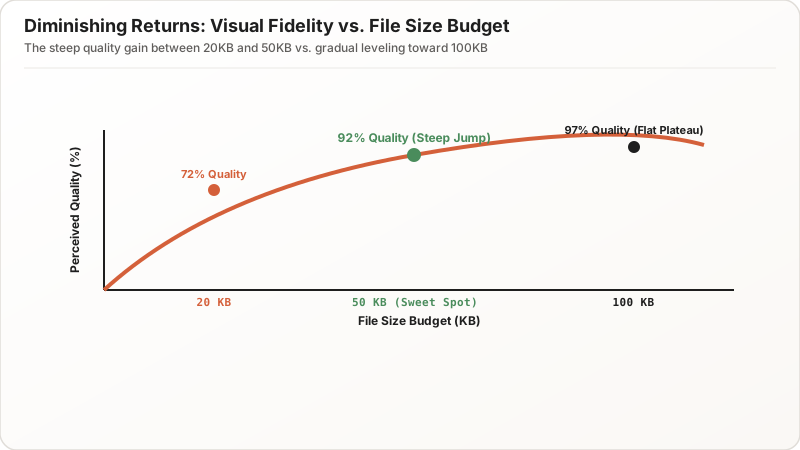
This middle tier represents a genuine sweet spot for many applications, balancing small upload size against meaningfully better appearance than the tightest 20KB constraint allows.
3. The 100KB Tier: Near-Lossless Visual Fidelity for High-Detail Photos
At 100KB, most photographs look close to their original quality, with compression artifacts becoming difficult to spot without zooming in closely. Fine detail, smooth gradients, and sharp edges all survive far better than at either smaller target.
This is often the point of diminishing returns. Going from 20KB to 50KB produces obvious improvement, but going from 50KB to 100KB, while still beneficial, yields a smaller visible gain relative to the additional file size spent, especially for simpler images that already looked clean at 50KB.
Visual Detail Analysis: How Image Quality Changes Across File Sizes
Fine Texture Retention in Hair, Skin, Fabric, and Backgrounds
Side by side, the progression from 20KB to 100KB tells a consistent story: compression artifacts shrink, texture sharpens, and gradients smooth out with each step up. The biggest single jump in visible quality typically happens between 20KB and 50KB, not between 50KB and 100KB.
Gradient Smoothness and Preventing Blocky Color Banding
This pattern holds across most photographic content, though busy, highly detailed images benefit more from the full range than simple, low-detail ones, which may already look nearly identical at all three sizes.
The Interplay Between Pixel Dimensions and Compression Quality
Downscaling Pixel Dimensions vs. Lowering JPEG Quality Sliders
Dimensions play a larger role at smaller targets. A 20KB budget often forces meaningful downscaling to look decent, while a 100KB budget can usually accommodate larger dimensions without needing to shrink them nearly as aggressively.
Allocating Pixel Density for Crisp Display on High-Resolution Screens
This means a fair comparison across all three sizes should account for dimension differences too, not just quality settings alone, since a 20KB image scaled down to smaller dimensions can sometimes look sharper than a 20KB image kept at full original size with quality slashed instead.
Why Image Content Complexity Directly Dictates File Size
Plain Studio Portraits vs. Detailed Outdoor Landscapes
Content complexity drives this more than most people expect. A simple, evenly lit headshot against a plain background might look nearly identical at 20KB and 100KB, since there’s little complex detail to lose either way.
High-Frequency Visual Edges and Entropy Compression Limits
A cluttered, high-contrast outdoor photo shows dramatic differences across the same size range, since it simply contains more data that compression has to work through. Understanding your specific image’s complexity helps predict whether a tighter file size limit will actually cause visible problems, or whether it’s overkill precaution for content that would compress cleanly anyway.
How to Accurately Benchmark Image Quality Across File Sizes
Standardizing Test Images, Formats, and Display Zoom Levels
The fairest comparison uses the exact same source image, resized to each target size using the same tool and method, then viewed at the same physical display size. Zooming in unevenly or comparing different source photos skews perception and leads to unreliable conclusions about which size actually “looks better.”
100% Scale Human Evaluation vs. Automated Verification Scanners
Side-by-side viewing at normal, 100% scale gives the most realistic sense of how a typical viewer, or an automated verification system, would actually perceive each version.
Decision Guide: When to Choose 20KB, 50KB, or 100KB Targets
Best Use Cases for 50KB to 100KB High-Clarity Images
The gain from a larger file size limit matters most for detailed photographs, professional portraits, and anything with fine texture or gradient content. It matters least for simple graphics, plain-background headshots, or already low-detail source images, where 20KB may already look essentially identical to 100KB.
When a 20KB Target Is Sufficient with Zero Noticeable Quality Loss
If a form gives you flexibility within a range, defaulting toward the higher end costs little in upload size while meaningfully protecting against visible quality loss for anything beyond simple content.
Summary & Recommendation: Choosing Your Ideal Compression Target
20KB, 50KB, and 100KB each represent a different point on the same trade-off curve, and the biggest single quality jump typically happens between the two smaller targets. Simple images tolerate tight limits gracefully; detailed ones benefit noticeably from extra room. Know your content, know your actual limit, and you’ll pick the right target instead of over- or under-compressing by default.