When (and Why) You Actually Need to Convert AVIF to JPG
Discover exactly when to use JPG instead of AVIF for websites, upload forms, email attachments, photo sharing, and print workflows.
Not every AVIF image needs converting. Sometimes the file works exactly where you need it, and touching it just adds an extra step. But other times, AVIF software compatibility gaps make converting to JPG the only practical solution. This guide breaks down exactly when to use JPG instead of AVIF, so you stop guessing and make the right format call every time.
Format Comparison: What Sets Modern AVIF Apart from Classic JPG?
Key AVIF Advantages: Next-Gen AV1 Codec, Smaller File Sizes, and HDR Support
AVIF is built on the AV1 open video codec, achieving up to 50% smaller file sizes than JPG at matching visual quality. It also natively supports alpha transparency, 10-bit/12-bit High Dynamic Range (HDR), and wider color gamuts (DCI-P3 / BT.2020)—features legacy JPEG cannot support.
Key JPG Advantages: Universal Device Compatibility, Browser Support, and Ubiquity
JPG / JPEG has been the global digital image standard since 1992. It is recognized by 100% of operating systems, browsers, mobile devices, hardware printers, and enterprise software. That universal compatibility is why converting AVIF to JPG remains vital for everyday tasks.
| Feature | AVIF | JPG / JPEG |
|---|---|---|
| Compression Ratio | Superior (30–50% smaller) | Standard |
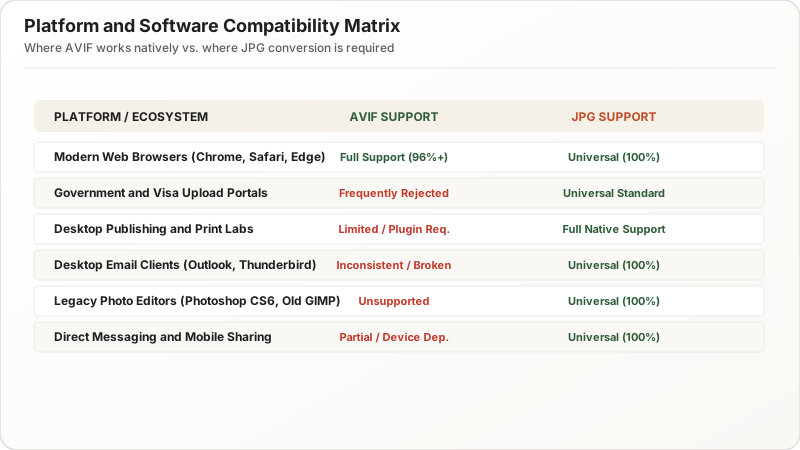
| Global Compatibility | Modern browsers (~93%) | 100% Universal |
| Transparency (Alpha) | Supported | Not supported |
| Hardware & Print Labs | Very Limited | 100% Universal |
5 Everyday Scenarios Where Converting AVIF to JPG Is Essential
1. When Online Application Forms and Government Portals Require JPG Only
Most governmental and official intake forms—such as passport renewals, visa application portals, driver’s licensing, and state benefits—strictly validate file extensions against .jpg or .jpeg. Uploading an .avif file triggers immediate “Unsupported File Format” validation errors.
2. When Job Application Portals and Applicant Tracking Systems Reject AVIF Files
Enterprise HR platforms, job application forms, and Applicant Tracking Systems (ATS) frequently fail to render AVIF headshots and resume attachments, displaying blank placeholders or rejecting submissions outright.
3. When Sharing Photos Across Messaging Apps, SMS, and Social Platforms
When sending images via WhatsApp, Telegram, SMS/MMS, or older messaging clients, recipient devices on older Android versions or Windows 10 machines may fail to display AVIF thumbnails. Converting to universal JPG guarantees the recipient can open and view the image instantly.
4. When Sending Email Attachments to Prevent Missing Thumbnail and Viewing Errors
Desktop email clients (like Microsoft Outlook 2016/2019/2021 and older Apple Mail versions) do not render inline AVIF attachments, displaying a broken attachment icon instead. JPG email attachments guarantee clean inline previews.
5. When Working with Print Labs, Kiosks, and Legacy Desktop Photo Editors
Commercial photo printing kiosks, drugstore photo centers, and desktop software (like older versions of Photoshop, InDesign, CorelDRAW) only accept standard JPEG/TIFF/PNG files.
When You Should Keep Your Original AVIF Files Intact
Preserving Maximum Color Bit-Depth, HDR Range, and Master Quality
If you are:
- Archiving master photo libraries on modern macOS/Windows 11 systems
- Serving web assets on modern websites configured with
<picture>tags - Storing images with alpha transparency
…keep the original AVIF file to preserve rich 10-bit color data and compact storage footprints.
Avoiding Generational Quality Loss from Repeated Recompression
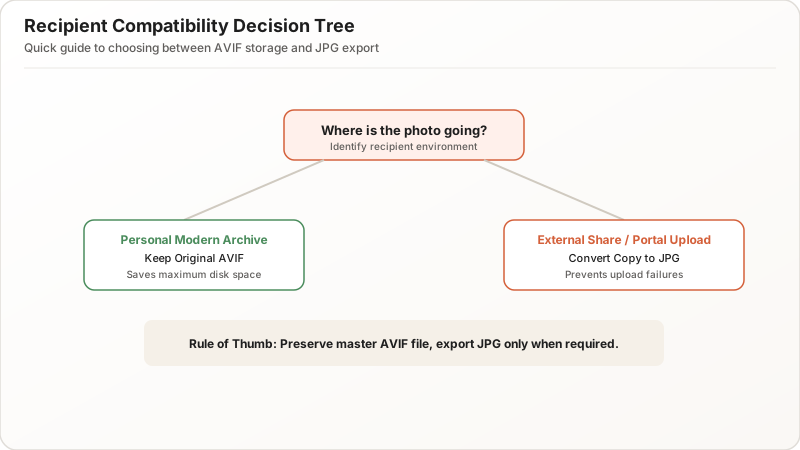
Every format conversion from one lossy codec to another introduces a small amount of generational quality loss. Always retain your master AVIF originals and export a JPG copy only when required for external submission.
Decision Framework: Quick Rule to Determine If You Need JPG Conversion
The 3-Step Destination Compatibility Checklist
- Does the receiving app, website, or person explicitly support AVIF?
- Yes: Keep AVIF.
- No or Unknown: Convert to JPG.
- Does the destination enforce a
.jpgor.jpegfile extension?- Yes: Convert to JPG.
- Is the image intended for physical printing or email attachments?
- Yes: Convert to JPG.
When to Convert to JPG vs. When to Retain AVIF Format
- Convert to JPG: Official forms, government portals, job applications, client emails, print kiosks, and universal photo sharing.
- Keep AVIF: Modern web performance, personal backups on modern hardware, and web development pipelines.
Summary & Key Takeaways: Making the Right Format Choice Every Time
AVIF is the future of web compression, but JPG is the present of universal compatibility. When in doubt, keep your master files in AVIF, and use a client-side AVIF to JPG converter whenever you need to upload, share, email, or print without compatibility roadblocks.